

Want to know 10 WordPress SEO tips for beginners?
If you have just started a blog and want to get organic traffic from Google, learning SEO is essential.
Many beginners ignore SEO, but without proper optimization, your blog can easily get lost in search results, making it harder to attract visitors and grow your traffic.
The good news is that WordPress is considered one of the most SEO-friendly website platforms in the world.
So, if you want to improve your WordPress website’s rankings, this comprehensive guide will help you get started.
In this beginner-friendly guide, you’ll learn 10 powerful WordPress SEO tips for beginners that can help your blog grow faster and rank better on Google.
What Is SEO (Search Engine Optimization)?
SEO is the practice that helps Google understand your website so it can rank your pages higher in search results and show them to the right audience.
SEO helps websites get free organic traffic without paying for ads and improves their visibility in search engine results over time.
SEO may seem complicated at first, but even small optimization steps can improve your website rankings over time. Develop a habit of learning SEO consistently and implementing new strategies.
Now, let’s explore the 10 best WordPress SEO tips for beginners.
1. Choose An SEO-Friendly WordPress Theme
Choosing an SEO-friendly theme directly impacts your website speed, design, and overall SEO performance.
There are many free and paid themes available, but you should choose a lightweight theme that improves website speed and enhances user experience.
Make sure your theme is mobile-responsive, since most of the audience uses mobile devices.
Choosing an SEO-optimized theme improves website performance, enhances user experience, and supports better rankings on Google.
If you are a beginner, I recommend the Astra theme because it offers excellent speed, mobile responsiveness, and beginner-friendly customization options.
Another option is GeneratePress; it is also beginner-friendly and known for its clean code and excellent performance.
2. Install a WordPress SEO Plugin
A WordPress SEO plugin helps your website rank higher on search engines by providing real-time optimization suggestions to improve your on-page SEO.
It helps you create meta titles and descriptions that make your content more clickable in search results and optimize keywords to reach the right audience effectively.
When I started writing my first post, I didn’t know much about SEO, but the SEO plugin helped me a lot by guiding me and improving my understanding of SEO.
So, if you are wondering which SEO plugin to install, I highly recommend the Rank Math SEO plugin.
But why?
Rank Math SEO is one of my favorite SEO plugins because it’s easy for beginners and packed with useful features.
While Yoast SEO and other plugins are good choices, Rank Math SEO stands out if you want more features and flexibility.
3. Use the Right Keywords to Rank Higher
Keyword research plays a crucial role in SEO, as the success of your content depends on targeting the right keywords. Choosing the right keyword helps build a strong foundation for higher rankings and organic traffic.
You don’t need to overthink keywords. Simply look at the search demand and competition for a keyword, then choose one that gives you the best chance to rank.
Sometimes random topics perform well, so beginners start thinking they should create content on random topics too. This is one of the biggest blogging mistakes beginners make. Instead, you should focus on choosing the right keywords that have the potential to perform well in search results.
How to Choose the Right Keywords for SEO?
You can use tools like Semrush, Google Keyword Planner, and Ahrefs to understand what people are searching for on Google and how difficult it is to rank for those keywords.
4. Improve Your On-Page SEO
On-page SEO is one of the best ways to generate organic traffic. Optimizing titles, descriptions, images with alt text, and keywords helps Google understand your content better and improves your chances of ranking higher.
On-page SEO includes:
- Title: Create an SEO-friendly title by including your main keyword naturally and keeping it clear and engaging.
- Meta description: Create an engaging and clickable meta description by including your main keyword naturally and keeping it around 150–160 characters long.
- Headings (H1, H2, H3): Proper use of headings (H1, H2, H3) means structuring your content in a clear hierarchy so users can easily read it and search engines can better understand your page. Use H1 for your main title (only one), H2 for the main sections of your topic, and H3 for sub-sections (under H2)
- Image optimization: Add ALT text to images. Compress images for faster loading to enhance page speed and search engine rankings.
- Keyword usage: Use relevant keywords naturally in your content to help search engines understand your topic and rank your pages better.
- Internal linking: Internal linking involves linking to relevant content to increase user engagement time and improve overall website growth.
On-page SEO refers to optimizing elements within a webpage like titles, meta descriptions, content, headings, and images to help search engines understand it better. It improves visibility and increases the chances of higher rankings. Quality content and proper keyword use are key factors in effective on-page SEO.
5. Improve Page Speed for Better SEO
Page speed plays an important role in SEO because slow loading times lead to poor user experience and lower traffic. For example, if a blog takes too long to load, users may leave and visit a faster website instead, which increases bounce rates.
You invest a lot of time learning and implementing SEO, but if your page speed is poor, your efforts may not deliver results. First impressions matter, especially in user experience.
How to improve page speed?
There are many methods to improve page speed, like image optimization, caching, minification, and CDN usage.
- Image Optimization: Image optimization refers to reducing the image size without affecting its quality. You can use plugins like Smush and Imagify to compress all the images on your blog while maintaining their quality.
- Browser Caching: Browser caching refers to storing website files in the user’s browser so that when the user visits your blog again, the saved files load faster because they do not need to be downloaded again. You can use plugins like WP Rocket and LiteSpeed Cache to improve website speed through caching and optimization features.
- Minification: Minification refers to removing nonessential spaces and comments from CSS and JavaScript files. It helps reduce file size and allows the browser to load the website more quickly.
- CDN (Content Delivery Network): A CDN helps deliver your content from the server closest to the user’s location.
6. Use SEO-Friendly Permalinks
A permalink is the URL of a specific page or blog post in WordPress.
A good permalink should be easy to read and should match the user’s search intent to improve search engine rankings.
It’s very important to keep it short (3–5 words) so users can easily understand your content, and you can include your focus keyword for better SEO.
Example:
blogguidance.com/wordpress-seo-tips Good
blogguidance.com/10-wordpress-seo-tips-for-beginners-to-rank-higher Bad
How to set SEO-friendly permalinks in WordPress?
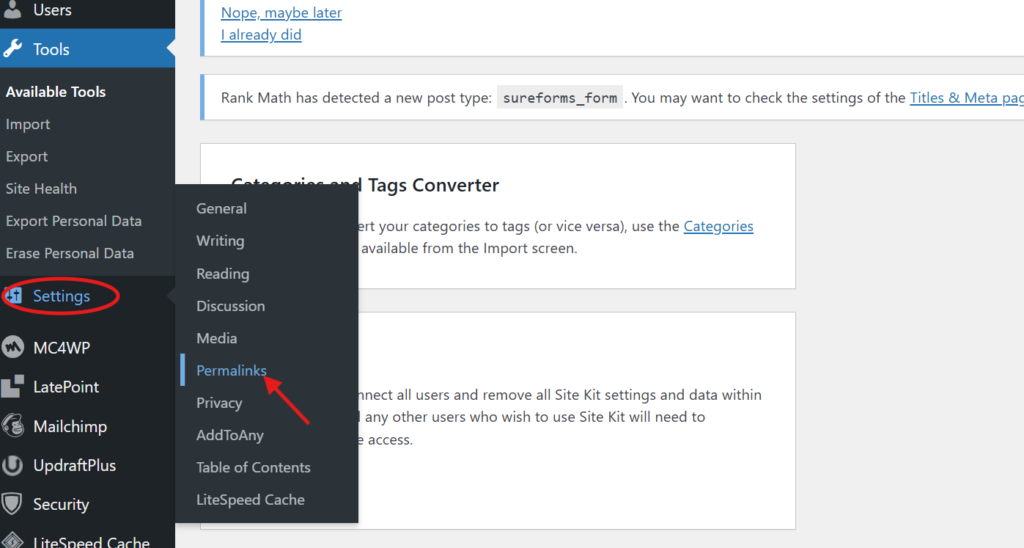
Go to your WordPress Dashboard → Settings → Permalinks
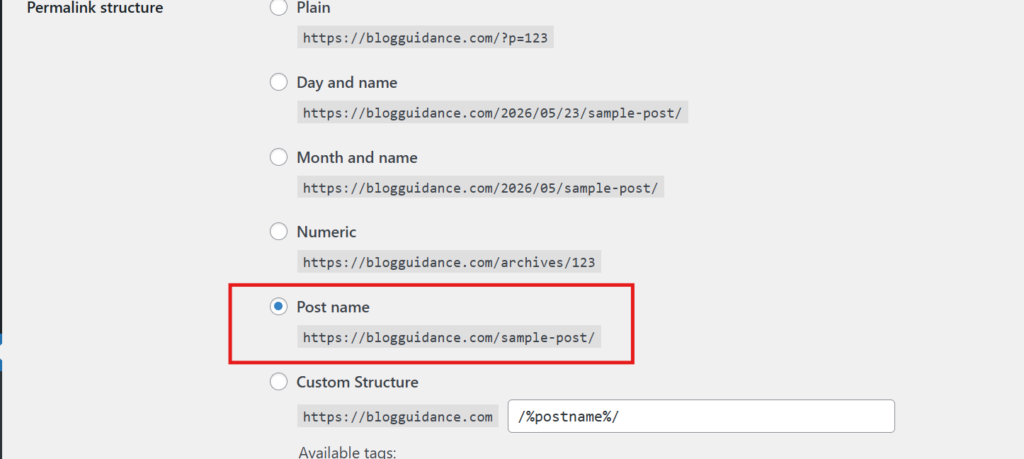
Select ‘Post Name,’ then save the changes.
7. Write High-Quality Content
Content is the main body of your post that helps users learn something valuable, so it is important to write high-quality content to keep readers engaged for a longer time.
Good content solves user problems by providing helpful and easy-to-understand solutions. It should match user search intent, include images and examples for better understanding, and use short paragraphs with simple language to improve readability. Most importantly, a strong introduction helps capture the reader’s attention from the beginning.
Write content that is complete and useful and covers the topic in depth. Comprehensive articles usually do better in search results because they offer more value to readers and answer user queries clearly.
Using examples, real experiences, and proof helps build trust with your audience and increases user engagement.
The best approach is to focus on solving your readers’ problems. Think like a teacher and ask yourself how you can explain topics clearly, help readers learn faster, and identify the problems that may confuse them.
Many beginners struggle while creating content because they do not have enough information about the topic. However, you can research through Google, social media, forums, and competitor blogs to gather ideas and then create original content in your own words.
8. Use Internal Linking to Boost Rankings
Internal linking is an SEO strategy that improves user engagement and boosts search engine rankings.
Internal links are links that direct users from one page or post to another page within your own blog.
It helps Google understand your blog better, keeps visitors on your site longer, and helps them discover related content.
If you don’t cover a topic in a blog post but have already written about it elsewhere, you can link to it so users can get complete information.
One of the biggest benefits of internal linking is that if any post is getting traffic from Google, you can guide visitors to other related posts, improving engagement and overall blog growth.
What is the best way to use internal links?
The best way to use internal links is to add relevant topic links within your content instead of directly pasting URLs and place them naturally in text, images, and buttons.
Focus on linking from high-traffic posts to low-traffic posts; this helps weaker posts also gain traffic and improve search engine visibility.
Don’t overpaste links; it can harm user experience and make your content look spammy and less readable.
9. Build High-Quality Backlinks to Improve SEO
Backlinks help your blog grow faster and are one of the most important ranking factors in SEO. They help your blog get traffic from external platforms such as social media, guest posts, YouTube, and other websites that link back to your content.
When Google sees that your blog is receiving high-quality backlinks from other websites, it considers your content more trustworthy and may improve your search engine rankings.
You can build backlinks from many platforms, like:
- Social Media: You can use Facebook Groups, Instagram, Twitter, Pinterest, and many other platforms to reach an audience interested in your topic and direct them to your blog.
- Question & Answer Sites: Use sites like Quora and Reddit to find questions related to your topic and help people by providing useful answers and linking to your blog when appropriate.
- Guest Posting: There are thousands of websites that allow you to publish content, such as Medium and LinkedIn. Writing articles on other blogs can help you generate backlinks to your own blog, which increases your blog traffic.
Focus on quality over quantity by generating backlinks from trustworthy websites instead of spammy or low-quality sources.
Avoid forcing users to click on links. Focus on providing valuable answers and guest posts, and naturally include your links in a way that creates curiosity and encourages readers to visit your full content.
10. Updating Content Regularly
Updating your blog regularly keeps the content fresh and relevant, removes outdated information, provides additional value to readers, and helps improve search engine rankings.
You may find some mistakes that you can improve to make your content more helpful, accurate, and SEO-friendly.
Regularly updating content also helps improve search engine rankings and encourages Google to crawl your posts more frequently.
Fresh and updated content looks more trustworthy, encouraging people to link to it and increasing your chances of earning backlinks.
I recommend investing at least 2 hours a day in updating your content. It helps you find mistakes, improve your posts, and develop one of the habits followed by successful bloggers.
Conclusion: WordPress SEO Tips for Beginners
These 10 WordPress SEO tips for beginners can help your blog grow faster, and after implementing them, you will start seeing results that boost your motivation.
To improve your WordPress SEO, focus on using an SEO-friendly theme, selecting the right keywords, improving page speed, creating quality content, using SEO plugins, and building strong backlinks.
As competition increases every day, improving your SEO is essential to stay ahead of other blogs. Even small optimizations can make a significant difference in your Google rankings.
Always remember, blogging is not a game of a single day. You have to be patient, consistently create content, do proper SEO for better optimization, and make a habit of learning something new every day.
Related Posts:
- How To Start A Blog On WordPress (Complete Guide 2026)
- 5 Blogging Mistakes Beginners Must Avoid (2026 Guide)
- How To Write A Blog Post For Beginners (Step-By-Step Guide)
If you found this guide helpful, share it with others.