

Want to Start a Blog on WordPress in 2026?
Congratulations! You have chosen the right time to start a blog on WordPress.
But why?
2026 is the perfect storm for blogging—there are more opportunities, smarter tools, and higher demand for helpful content than ever before.
In this blog,
I have explained to you in a simple way how you can start a blog on WordPress. If you read this blog carefully, you will come to know about the mistakes that every beginner makes.
Starting a blog on WordPress is not very difficult, and there are many tutorials available on how to start a blog on WordPress. However, some guides are not beginner-friendly, which can reduce your motivation.
This simple guide is designed to make the process easy, so you can start a blog on WordPress in under 30 minutes.
What is blogging?
In simple words, blogging is writing or sharing your thoughts, stories, or tips on a website to help the readers or solve their problems.
For example:
- Sharing how to cook a recipe
- Teaching people how to start a blog on wordpress
- Writing about your experience
Some benefits of blogging:
- Share your knowledge & passion – Blogging helps you to share your knowledge, thoughts, stories & opinions with the people.
- You can help the readers & create a loyal fanbase—you can help the readers by solving their problems; by this, they will become your true fans.
- Earn Money Online – There are various ways to make money with blogging, like running ads, affiliate marketing, sponsored posts, and many more.
Why Choose WordPress for Blogging?
WordPress is the most popular blogging platform in the world.
Key benefits:
- Easy to use (beginner-friendly)
- Highly customizable
- Thousands of free themes & plugins
So, I hope you now understand why you should start a blog on WordPress.
8 Simple Steps to Start a Blog on WordPress in 2026
I tried my best to make you understand how you can start a blog on WordPress in these 8 steps.
Read the steps carefully and turn your thoughts into actions.
Step 1: Choose Your Blogging Niche
This is the initial and the most important part before starting a blog.
A niche is the main topic of your blog. Choosing the right niche is crucial for growth and monetization.
If you choose a niche according to profitability but you are not passionate about it, then this is not a good niche.
Similarly,
If you choose a niche according to your passion but not profitability, then this is also not a good niche.
You should choose a niche that is profitable and you are really interested in.
Did you know?
Many beginners start blogging with full excitement & motivation. writing post after post, but still see no traffic, no growth, and no income.
The real problem isn’t their hard work—it’s their niche selection. Choosing the wrong niche is like building a house on a weak foundation.
But I don’t want you to make that mistake.
So, let’s talk about the formula to find a good niche. Here it is —
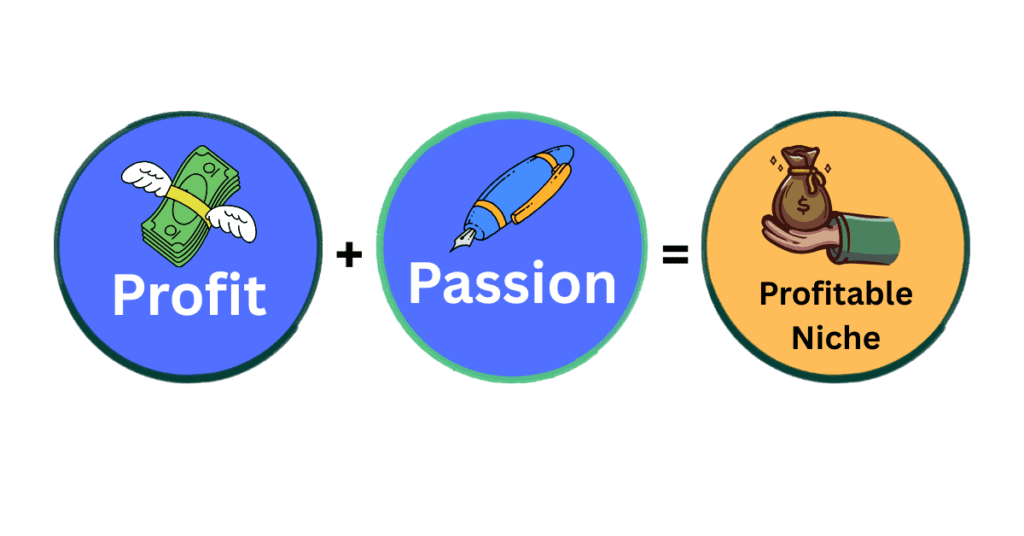
Analyze these two factors to find the best niche for you —
Profitability:
- Find out if you can make money from that niche.
- Is that niche good in volume of keywords and monetization options?
- Are there products to promote?
- Do people spend money here?
- Examples: health, finance, technology & digital marketing.
Passion:
- Are you really interested in that niche?
- Can you help people by solving their problems through your blog?
- Do you enjoy writing in that niche?
In simple words,
Passion gives consistency; profitability gives income.
I hope you have figured out which niche you should work in.
But if not, I’d like to help you.
The 3-step practical formula:
Step 1: interest + skill
Ask yourself,
- What do I enjoy writing about?
- What do I know that I can express through my blog?
Step 2: Demand (Audience)
Check if people are searching for it.
How to check?
- Search the topic on Google, then check suggestions.
- Use other social media platforms like YouTube, Instagram, Facebook & Pinterest.
- Use Google Trends—Check if the topic is growing or not.
Step 3: Monetization (MONEY)
- Do people spend money here?
- Are there products to affiliate with?
I hope this blog will help you to start a blog on WordPress; just keep reading until the end.
Step 2: Choose a Domain Name
A domain name is your website’s name on the internet. It makes your website easy to find. Example: youtube.com, facebook.com
Many beginners don’t know what the character of a good domain is, but I will show you the tips to choose a good domain for your blog.
In simple words, a website is a house, and the domain name is your house address.
Finding a good domain name is very important—it can impact your branding, SEO, and trust.
There are some tips to find a good domain name for your blog–
- Keep It Short & Simple: It’s very important to keep your domain short because if you make it too long, then no one can easily remember it. If users forget your domain, they won’t come back again. Use simple words, then the user can easily type your domain. Example: bestbloggingguidein2026.com looks very hard to type or remember; blognest.com looks very easy to type or remember.
- Include Keywords: Use the main keywords for better SEO and clarity about your content type.
- Avoid Numbers & Hyphens: Numbers and hyphens make your blog name complicated and difficult to remember.
- Choose the Right Extension: I recommend you choose .com because it is worldwide, but if your targeted place is India, you can choose .in.
Step 3: Buy Web Hosting
Web hosting is a service where all the files and data of your website are stored, like images, posts, pages, etc., so people can access it on the internet.
Web hosting is like the hard disk of your computer.
I know you are confused about websites, domain names & web hosting. Let’s take an example:
- Website = Your house
- Domain name = Your house address
- Web hosting = The land where your house is built or the space in it.
Now you must be thinking about which web hosting is best for you.
A good hosting service ensures your website loads fast, stays online (high uptime), and gives visitors a smooth experience.
There are tons of web hosting providers, but which web hosting you should choose depends on your needs and budget. If you are a beginner, I recommend you go with Hostinger.
But why Hostinger?
Hostinger gives you the best value with a very cheap and affordable price (starts around ₹69/month) with a free domain for the 1st year. Hostinger uses LiteSpeed web servers and SSD storage, which help your website load quickly. Fast speed improves user experience and SEO rankings. It gives a beginner-friendly control panel, which is very easy to use.
So if you are looking to buy web hosting, I highly prefer to try hostinger.com.

(Note: Use my link and get 20% off your Hostinger plan.)
After opening the link, click on “Pricing,” and you will see an interface like this.
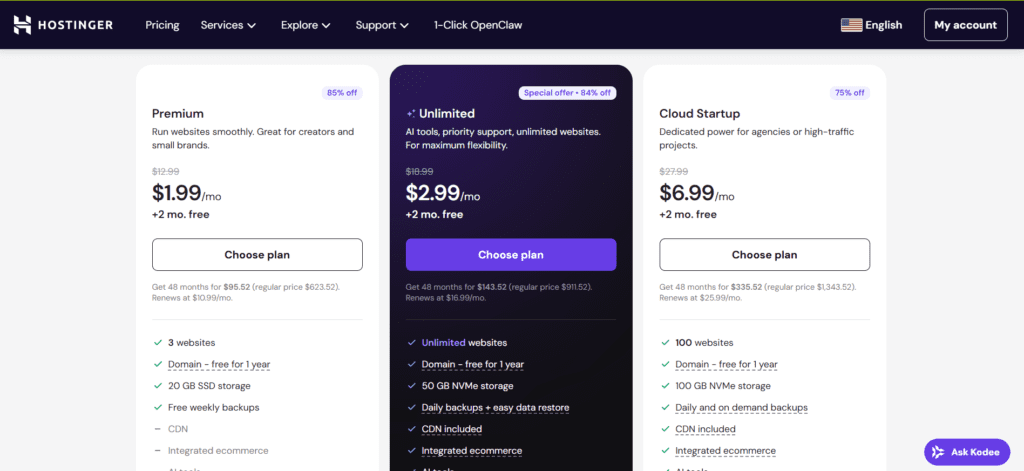
Here you are asked which plan you want. You can pick any of them according to your budget.
I recommend you go with the premium plan because it is affordable and will be the best choice for beginners. But if you can afford more, then you can choose any other plan also.
After Choosing Your Plan Click on “Choose Plan.”
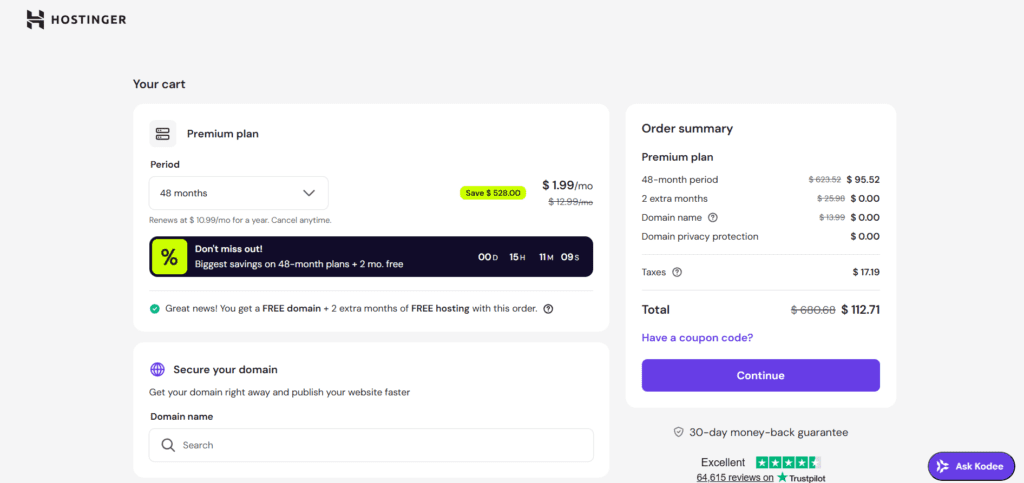
You can see the order summary here. You can select the time period
I recommend you choose at least a 12-month plan.
If you haven’t purchased your domain name So you know Hostinger gives you a free domain for 1 year.
You can search & select your free domain.
Then Click Continue
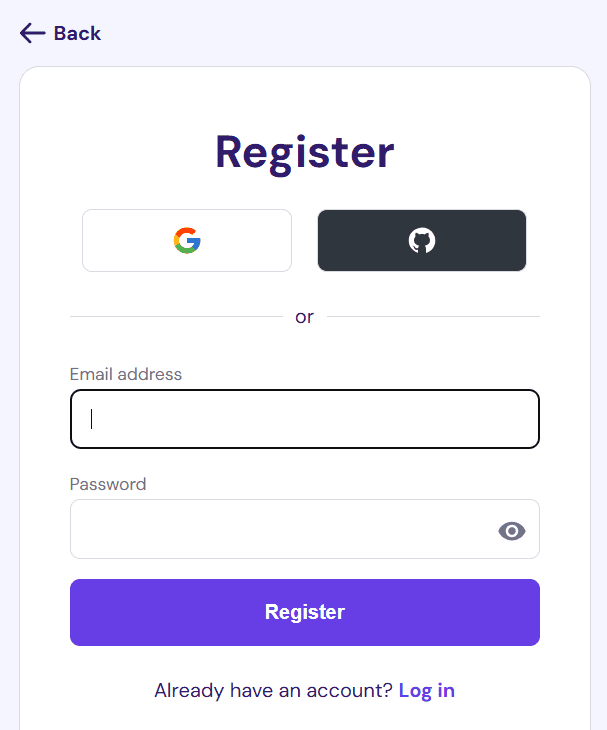
Register Your Account by Entering Email & Password
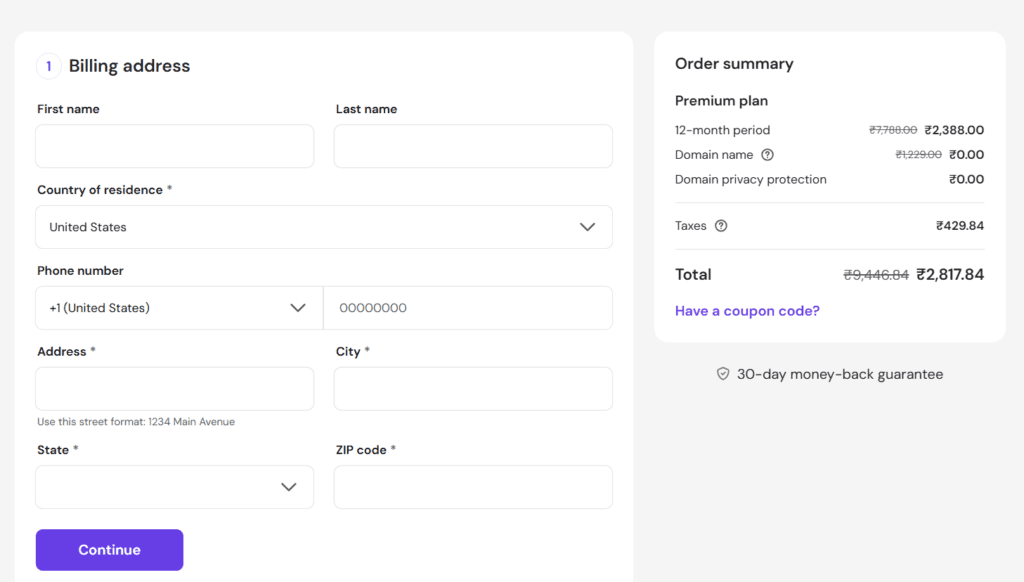
Enter Your Billing Address, then click Continue
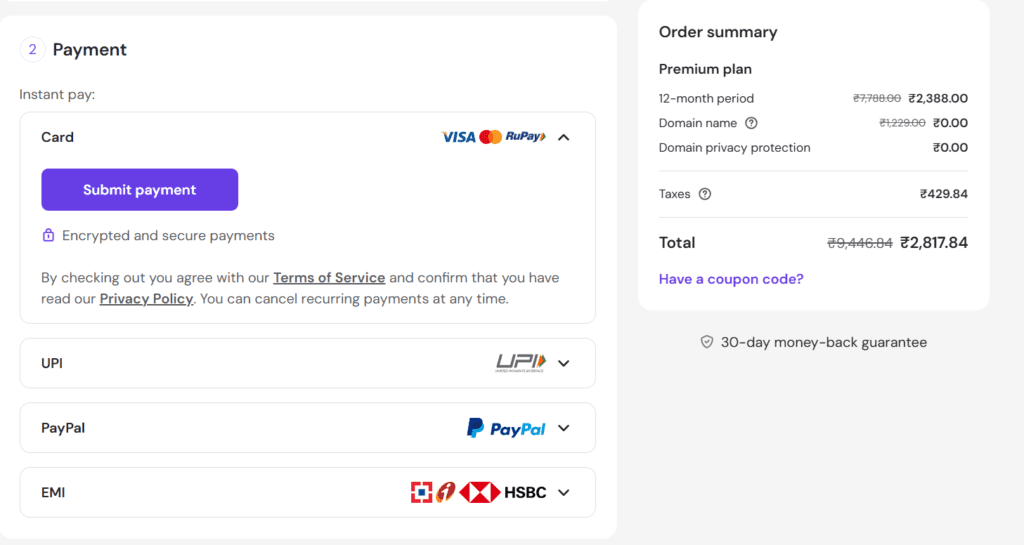
Select Your Payment Method and Make the Payment
Congratulations! You Are All Set.
This is the part people think about the most, and the one who keeps thinking about it cannot do anything.
“If you want to successfully start a blog on WordPress, remember one thing first—never give up.”
Step 4: Install WordPress to Your Blog
Now, let’s install WordPress on our website.
Installing WordPress is not a big deal; just follow the steps.
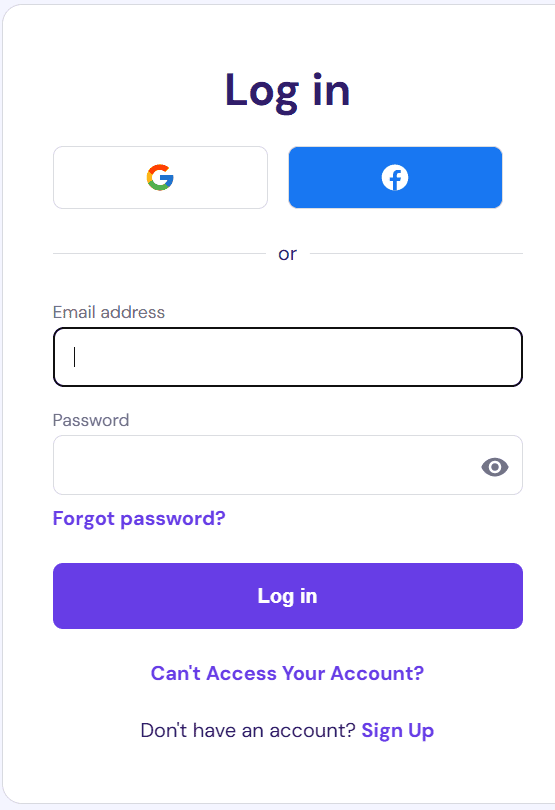
Login to Your Hostinger Account
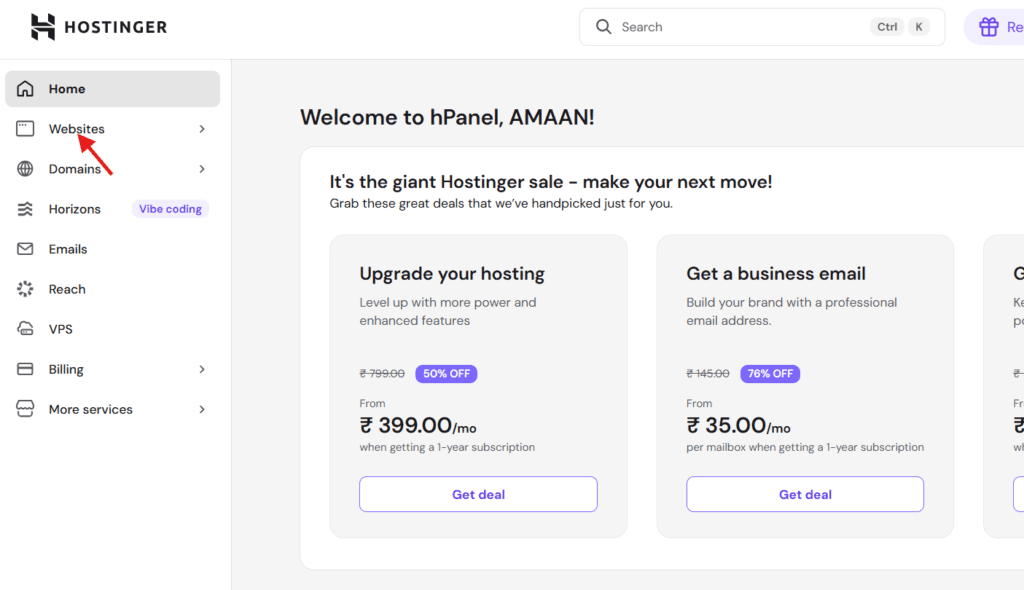
Go to Websites
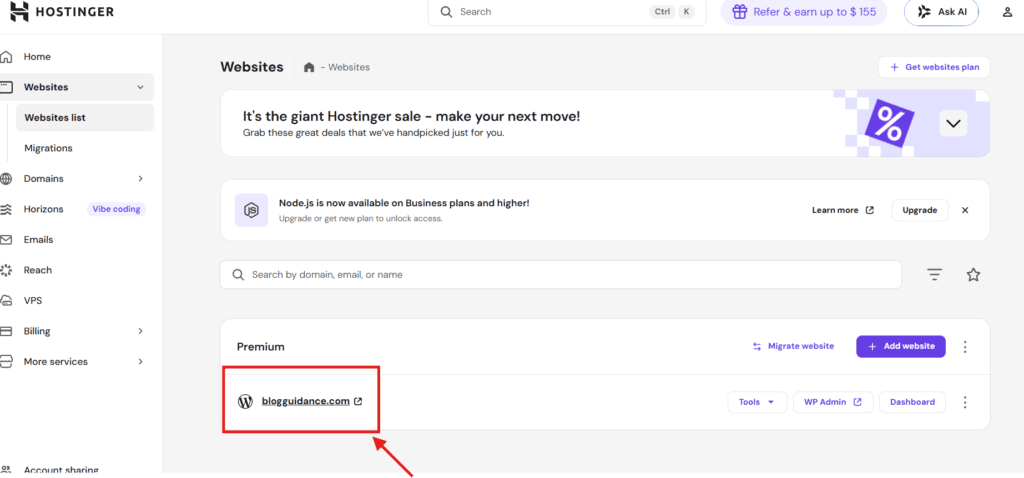
Click on “Manage” Next to Your Domain Name
Find out Auto Installer or Website Setup. Click on it, then choose WordPress.
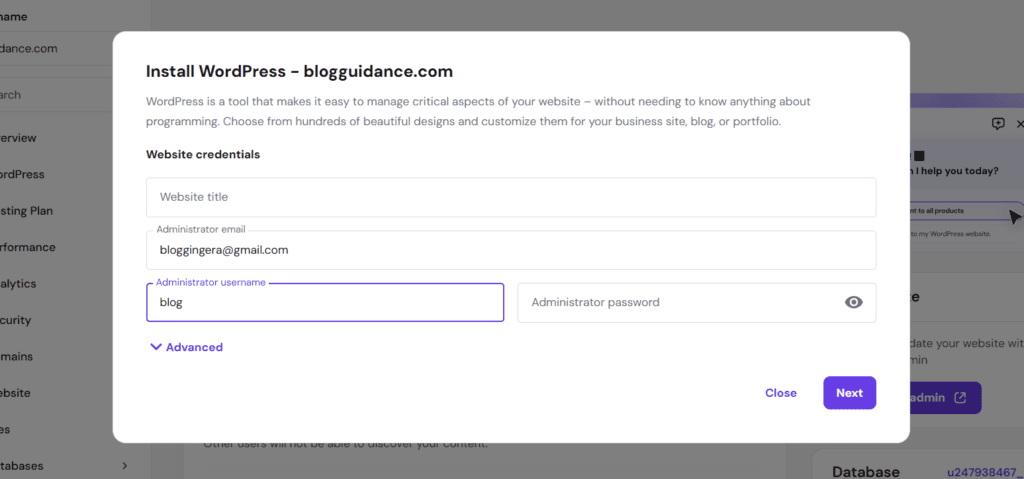
Fill up WordPress details:
- Website Title
- Username
- Password
Then Click Next
Your WordPress is installing; it will take a few minutes to install WordPress.
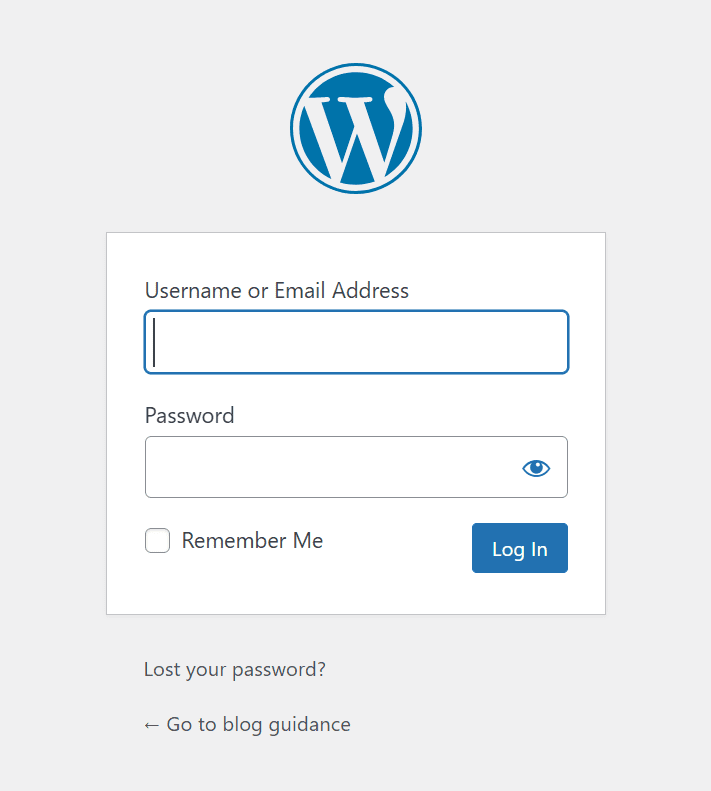
Now log in to your WordPress dashboard; enter your email & password, which you had just created.
Congratulations! Your WordPress site is now live
You have completed all the steps before starting a blog; now you have to customize your blog, so let’s move ahead.
Step 5: Choose an Attractive Theme

Now you have to design your blog.
What is a theme?
A theme is an overall layout and a design of your website. You can customize everything as per your choice, like colors, images, layout, fonts, etc.
Choosing a good theme is very important because it makes your website look professional and trustworthy, improves user experience
Choosing a bad theme can affect its performance and growth. A bad theme can make your site slow while also hurting your rankings on search engines.
We have to choose a theme that offers fast loading speed, mobile-friendly design & easy customization options. Choose a lightweight theme to make your website run quickly.
You will see many free themes available in your WordPress, but you have to choose the best one.
If you have created your website for business, then its security should also be good, and the free themes get hacked easily.
So which theme will be good for you?
I recommend you try anyone from these two themes:
Astra Pro –
Astra Pro is the most popular theme in WordPress; it is extremely lightweight (under ~50KB) and loads very quickly, which improves the user experience.
It is highly customizable with advanced customization options, allowing you to easily customize your blog with the help of page builders like Elementor and Gutenberg.
Its fast loading speed also contributes to better SEO.
ThemeIsle –
ThemeIsle will also be a good option for you because it is beginner-friendly.
You can customize it easily without coding, and it gives fast loading speed.
ThemeIsle is not just a single theme; it’s a WordPress theme provider.
They create popular themes like Neve, Zelle, and many more.
You can choose any of these themes; both are good.
After purchasing the theme, you need to install it on your site.
How do I install a theme?
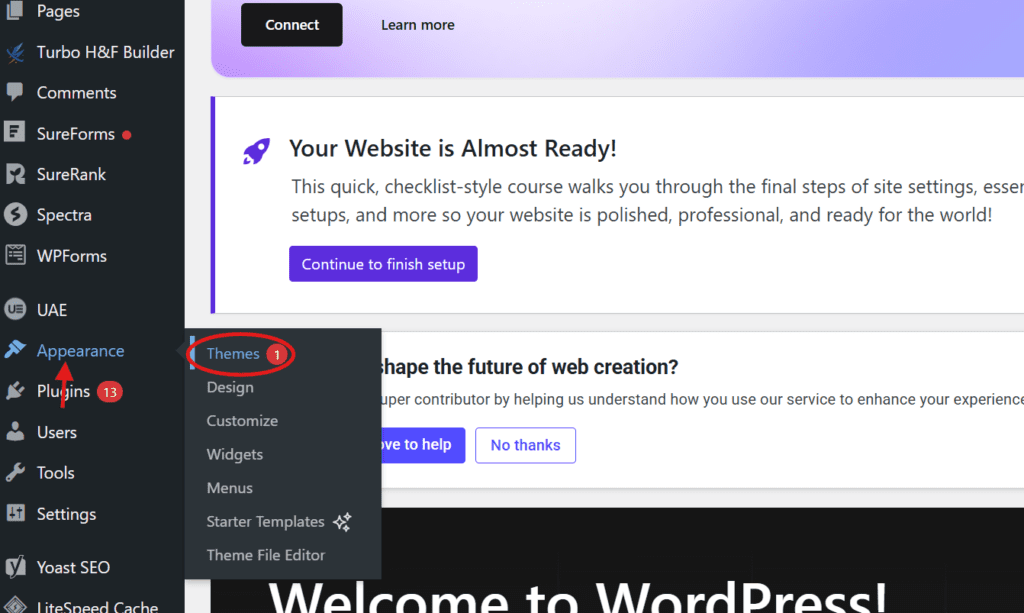
Go to your WordPress Dashboard > Appearance > Themes.
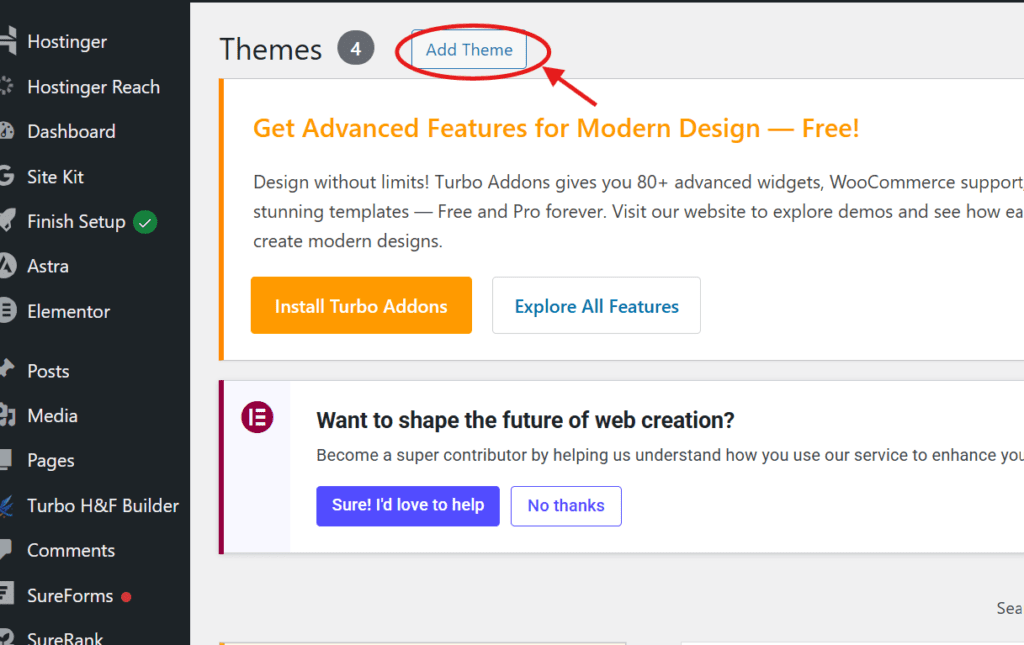
Click on “Add Theme.”
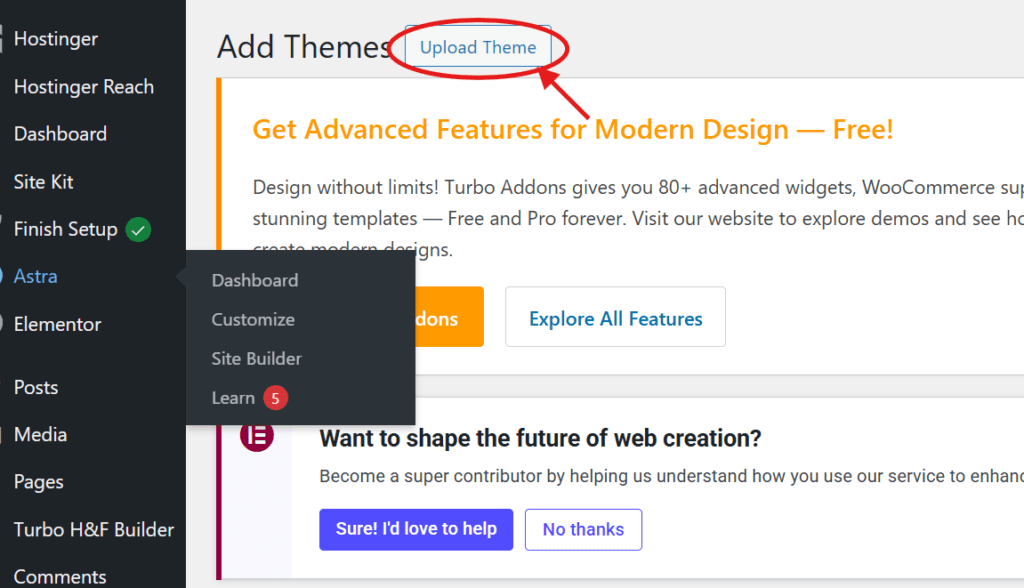
Finally, upload your purchased theme and activate it on your website.
You’ll see some free themes here, but if you’ve purchased a theme, you can upload it.
You’ve activated your theme on your site; now you need to customize it.
How to customize your site?
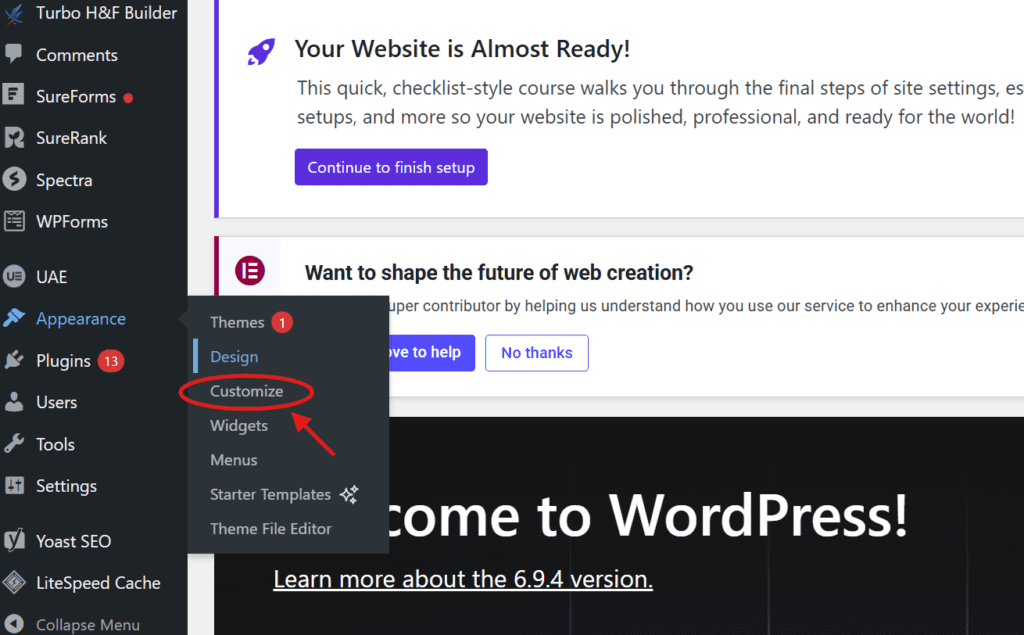
It’s very simple: go to Dashboard → Appearance → Customize.
Now you can customize your theme according to your preferences.
Let’s now install some essential plugins on our website.
Step 6: Install Essential Plugins
Plugins are an essential part of your WordPress website because they add powerful features that enhance functionality, help optimize your site, and improve SEO.
Are you still confused about plugins?
Plugins are software that help you add new features to your website without coding. Example: add contact forms, security, analytics, and many more
Here are some essential plugins that every WordPress blogger should install —
1. Rank Math SEO
This plugin helps you improve your website’s SEO and attract more organic traffic.
This is my favorite plugin for SEO because it makes optimization easy and effective.
Rank Math SEO optimizes your titles, meta descriptions, and keywords to help you attract organic traffic without paying for ads.
Rank Math is the ultimate plugin for SEO optimization.
2. LiteSpeed Cache
LiteSpeed Cache improves loading speed through caching, which can help improve your website’s search engine rankings.
A fast loading speed improves user satisfaction and engagement.
It’s clear why this plugin is essential.
3. WPForms
It’s one of the best plugins for creating forms.
You can create forms like contact forms, feedback, support forms, and many more.
It’s beginner-friendly and lets you create forms very easily.
4. Elementor
Elementor is a popular WordPress page builder.
You can build any page simply by dragging and dropping elements.
The best thing about Elementor is that it lets you design any page visually, with no coding required and simple customization options.
5. iThemes Security
The iThemes Security plugin is used for the protection and security of your website from hackers.
Security is essential for protecting your website and data.
6. Anti-Spam
Spam comments can harm your blog by damaging SEO & creating a poor user experience.
So it’s important to protect your blog from them.
This plugin automatically detects and blocks spam comments.
7. UpdraftPlus
If our website data is lost, we can restore it using a backup.
UpdraftPlus ensures your website data is safe with automatic backups and easy recovery options.
8. Smush
Smush helps in optimizing all images available on your website without losing quality
This helps improve your website’s loading speed and overall performance.
These are some essential plugins that every website should have.
Remember one thing before installing a plugin—always check if the plugin is compatible with your WordPress version and is from a reliable source.
How to install plugins on a website?
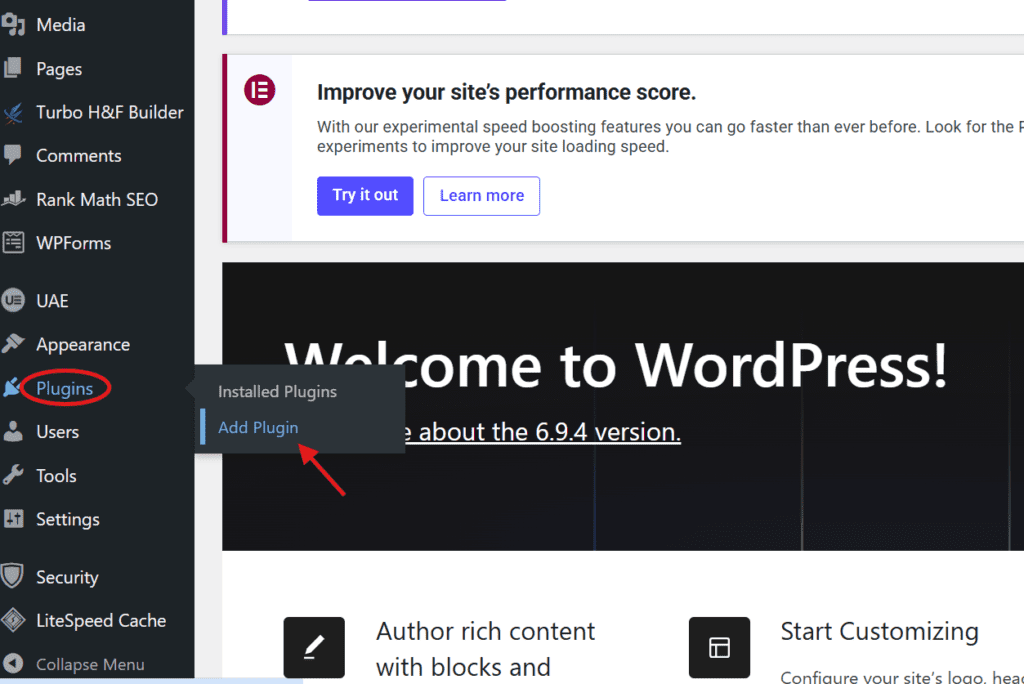
Go to your WordPress dashboard → Plugins → Add Plugin
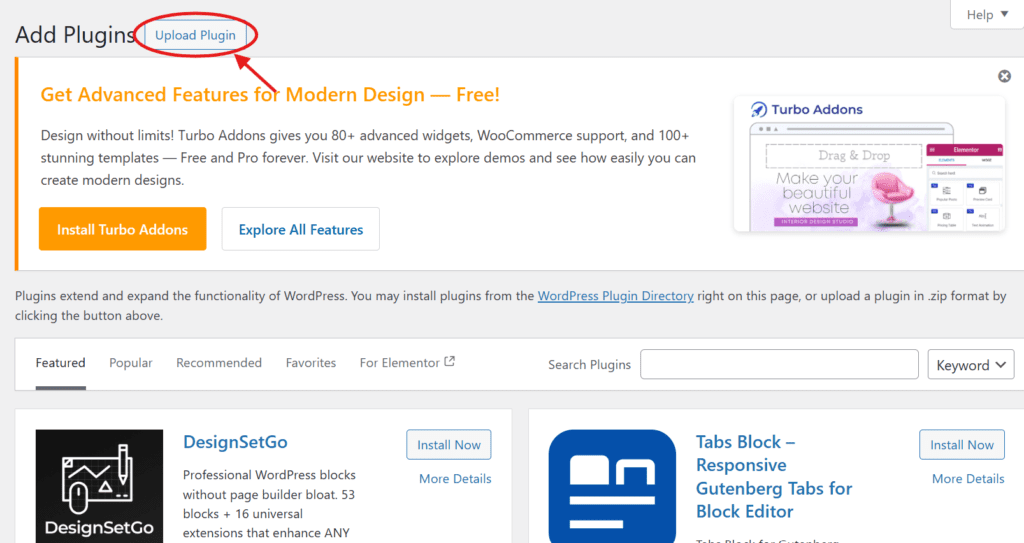
If you have a downloaded plugin file, you can upload it and click ‘Install Now.’ After installation, click ‘Activate’ to start using it.
Step 7: Start Writing Your First Blog Post
Now, let’s create our first blog post to share our knowledge with the world.
A blog post is content published on a blog that helps readers learn about a topic or find answers to their questions.
You have to focus on how you can solve people’s problems.
To create a blog post, go to your WordPress Dashboard → Posts → Add Post
First of all, you need to find a topic related to your niche.
You can use keyword research to identify popular and relevant topics in your niche.
Follow these tips to create your first blog post successfully —
- Always include numbers and powerful words to create titles people can’t ignore.
- Create a lengthy article to improve search engine rankings and give readers detailed content.
- Use internal links to keep readers on your site longer.
- Use headings, subheadings, and lists to help Google understand your content structure.
- Break long paragraphs into points to improve readability and user experience.
- Always use images in your blog to help readers understand the content better.
- Use questions in your blog posts to help you find out what people think and increase comments.
- Always use long-tail keywords to rank higher with less competition.
Now it’s your turn to put these tips into action.
Let’s move to the next step—now you’ll learn how to make money from your blog.
Step 8: Some Ways to Make Money From Your Blog
Now it’s time to make money from your blog.
Money is often the strongest motivation.
There are many ways to make money from blogging.
These are the most effective ways to earn money through blogging:
- Affiliate Marketing: Affiliate marketing is one of the best ways to make money online. You can promote other people’s products or services on your blog using an affiliate link. If a reader buys a product through your link, you’ll receive a commission from the seller. You can sign up for affiliate programs relevant to your niche.
- Advertisement: You can use ad networks like Google AdSense, Media.net, and InfoLinks to display ads on your blog and earn money per click or impression. You can use any of them.
- Sell Your Own Products: Sell your own products on your blog—digital items like eBooks and online courses, or physical products like books and merchandise. Before selling anything, understand your audience so you can use surveys and polls to learn what they want.
- Sponsored Posts: You can create sponsored content for brands or companies about their products or services, and they will pay you for your work.
There are many other ways to make money from blogging.
At first, focus on learning and growing, not just on making money.
You still have a lot of things to learn.
With patience and hard work, you can achieve any goal.
FAQs (How To Start a Blog On WordPress)
How long does it take to earn from blogging?
In the beginning, you need to learn all the things that can help you become a professional blogger. First, invest your time in learning.
After that, how long it takes to earn from blogging depends on your hard work and consistency.
If you use your knowledge to help readers and they find your articles valuable, your blog will start growing. In my opinion, you can expect to earn your first dollar within 5 to 6 months.
How much does it cost to start a blog?
Starting a blog costs around $21 to $53 per year, including a domain and hosting.
If you are a beginner, it’s best to choose a 1-year plan to get started.
You can also start for free, but it’s not recommended if you want to make money from your blog.
Is blogging a good way to make money online?
Yes, there are many ways to earn money from blogging, such as advertisements, affiliate marketing, and selling products.
Blogging allows you to earn money even while you sleep, once your content starts attracting readers.
How can I get traffic to my blog?
You can attract traffic through SEO, social media promotion, email marketing, paid ads, and other methods.
Focus on creating high-quality content with proper on-page SEO to improve your chances of ranking higher in search engines.
Why should you start a blog on WordPress?
WordPress is one of the best platforms to start a blog because it is easy to customize and SEO-friendly.
WordPress allows you to create a professional website without coding.
Conclusion on How to Start a Blog on WordPress
It is easy to start a blog on WordPress, but consistent effort and daily learning are essential for success.
There are still many things to learn about blogging; keep learning and apply it to your blog.
I hope you now understand the essential things you need before starting a blog.
Now, apply what you’ve learned from this comprehensive guide and take your first step.
Remember, the best time to start a blog on WordPress is now.
Your blogging journey starts today.
If you found this guide helpful, please share it with others.
hello